The part you need doesn't exist. Describe it.
Text to CAD for functional parts and assemblies. Then simulate it, render it, animate it and find the components to buy.
Free designs are shared in the community gallery. Pro keeps them private.


Or start by remixing


01 · From the Community
Made with Ragnar
Real models from the community. Every shared model is a starting point: open one, remix it, and make it yours.
55,000+ parts built by 25,000+ makers
02 · Features
Starts with CAD. Doesn't stop there.
Most AI CAD tools stop at the model. Ragnar keeps going, the way an engineer would: once the model exists, it answers the questions that come next, so you can improve the design before you build it.
CAD
01 / 04
01
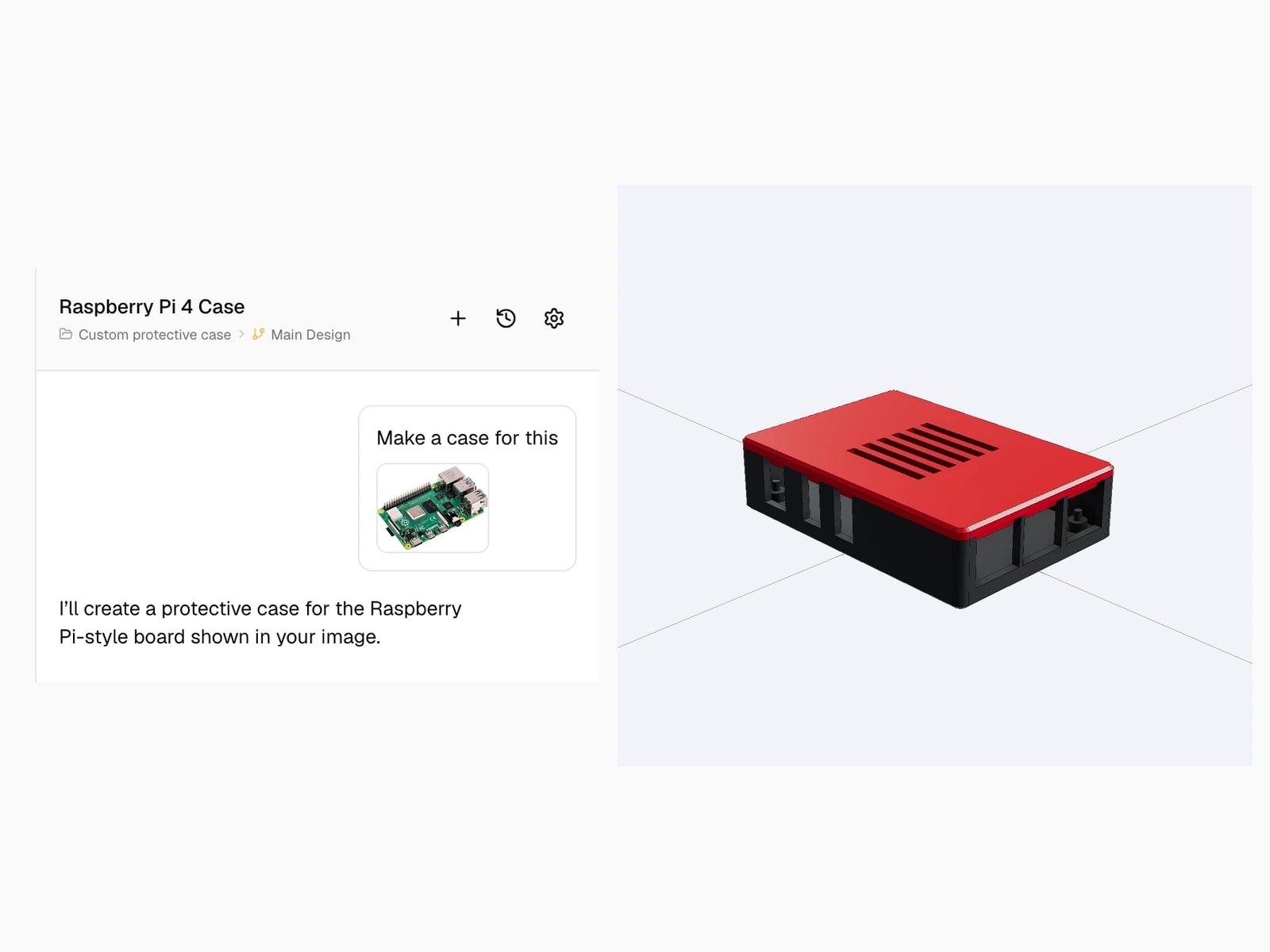
Text or image to CAD
Describe it (“a wall mount for my router, with slots for the cables”) or drop in a sketch, a photo or a drawing. Ragnar builds a precise B-Rep solid, not a mesh.

02
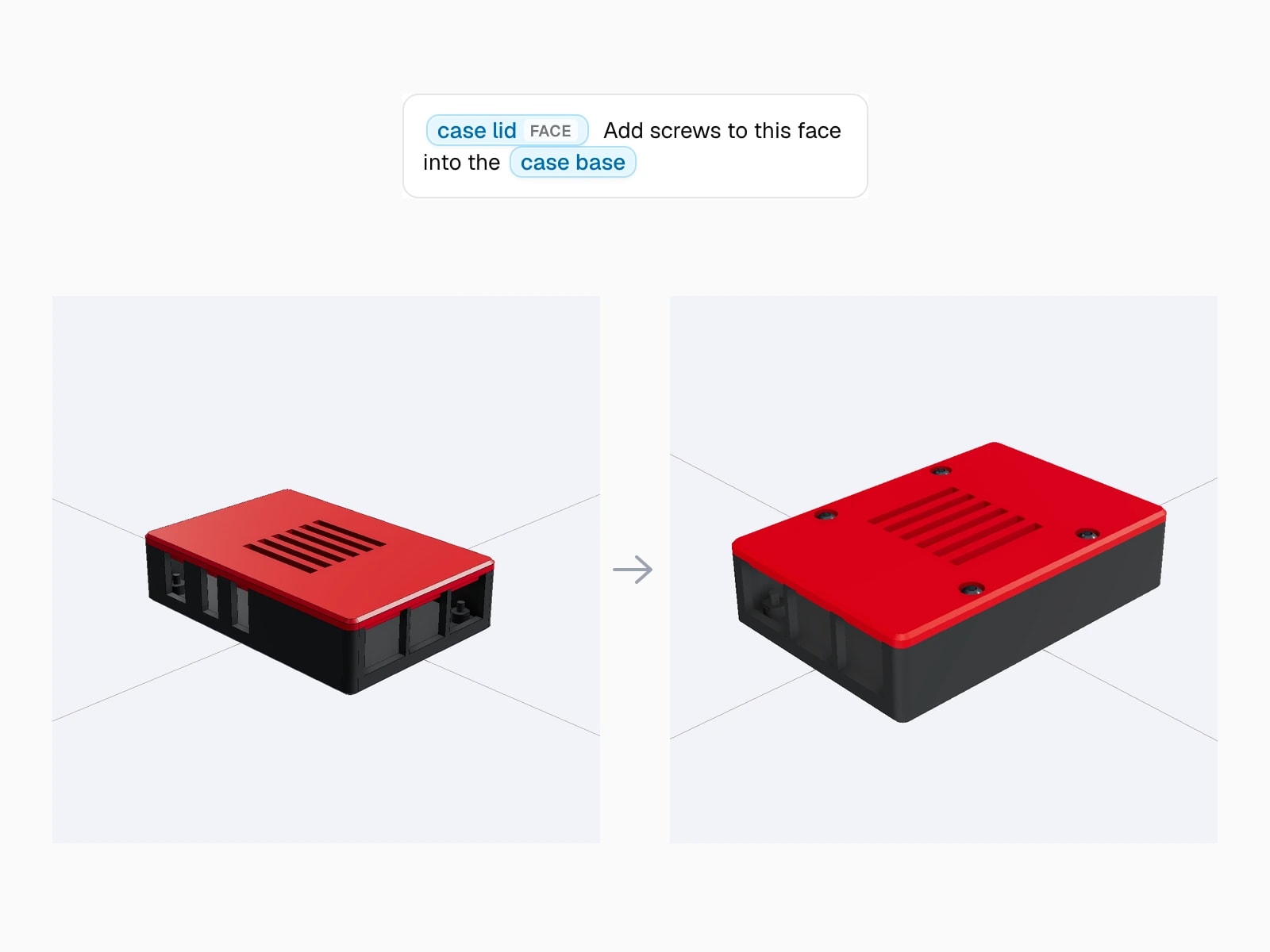
Iterate with words
“Make it taller.” “Add a 5 mm fillet.” “Cut a slot here.” Extrude, fillet, loft and boolean cuts, driven by conversation. Point at exact geometry with @bracket.face when you need surgical control.
03
Inspect and export
Rotate, zoom, check every detail. Then STL for your printer, STEP for manufacturing or any other tool, DXF with clean layers for the plasma table, GLB for the web.
04
Built for teams
Private projects, a shared workspace, versions and checkpoints, invited editors, and admin visibility of who used what.
Teams
Vented enclosure
PrivateBeyond CAD
05 / 09
05
Simulate
Will it hold?
Run a FEM simulation on the model you just made. Find the thin wall or the weak boss before you build it, not after.
Simulate
06
Render
How will it look?
Renders in the materials and lighting you ask for, for a client, a product listing or a pitch deck. No export, no second tool.

07
Animate
How does it move?
Exploded views and motion animations that show how the parts fit together and how the mechanism works.
08
Source the components
What do I buy?
Ragnar searches the web for the screws, bearings, motors and boards your design calls for, and gives you a parts list with links.
Source
What do I need to buy for this?
Here is what the enclosure calls for:
- 4×M3 × 10 socket head screw
- 4×M3 heat-set insert
- 1×40 mm 5 V fan
- 1×USB-C power socket
- 1×ESP32-S3 board
- 1×SHT40 sensor board
09
Wire it
How does it connect?
Circuit diagrams for the electronics inside the enclosure you just designed, with the components you sourced.
Wire
All of it in one conversation.
03 · How It Works
From Idea to Reality in 4 Steps
Design against the real part, not just the render
Describe or show your idea
Type what you need, upload a photo or drawing, or start from a shared model. Ragnar builds it in minutes.
Iterate until it's right
“Make the pins thinner.” “Add a cable slot on the back.” Refine by describing changes. Need surgical control? Point at exact geometry with references like @bracket.face.
Check it before you build it
Simulate the load. Render it for the client. Pull the parts list. Find out now, not after the build.
- Simulate the loadChecking
- Render it for the clientChecking
- Pull the parts listChecking
Export and build
STL straight to your 3D printer. DXF with clean layers for your plasma or laser table. STEP for manufacturing or other tools, whole model or part by part. Your model stays live in Ragnar.
Entire Model
STEP · Parametric
04 · Live Examples
See It In Action
Real sessions, recorded in the app. From first idea to exported file.
A plain-language prompt becomes a printed physical product
05 · Use Cases
What People Build
Functional parts, from print bed to plasma table. Designed in minutes, fabricated the same day.
FDM & Resin
Electronics enclosures, threaded caps and adapters, custom brackets and mounts, drone parts in PETG and TPU.
- Print-aware: wall thickness, bed size, orientation
- Watertight, manifold geometry on export
- Iterate until the fit is right
Engineering
Gearbox housings, tool turrets, linear slide beds, mold and nozzle assemblies, fixtures.
- Multi-part models with proper positioning
- Export STEP part by part into larger projects
- Minutes instead of hours on a blank canvas
Plasma & Laser
Plasma-cut brackets, gussets, mounting plates, tab-and-groove joinery, flange layouts.
- DXF export with CNC-ready layers (CUT, BEND)
- Speaks the trade: clevis, gusset, flange
- From sketch to cut file in one session
Hardware
Robot chassis, servo mounts, FPV drone brackets, PCB enclosures, sensor housings.
- Screw bosses and bolt patterns where you need them
- Material-aware: rigid PETG walls, flexible TPU mounts
- Multi-part assemblies with proper positioning
Product
Cabinets with joinery details, product concepts, architectural elements.
- Full 3D models plus DXF plans for panels
- Iterate materials and proportions in conversation
- GLB export for clients and collaborators
FDM & Resin
Electronics enclosures, threaded caps and adapters, custom brackets and mounts, drone parts in PETG and TPU.
- Print-aware: wall thickness, bed size, orientation
- Watertight, manifold geometry on export
- Iterate until the fit is right
Engineering
Gearbox housings, tool turrets, linear slide beds, mold and nozzle assemblies, fixtures.
- Multi-part models with proper positioning
- Export STEP part by part into larger projects
- Minutes instead of hours on a blank canvas
Plasma & Laser
Plasma-cut brackets, gussets, mounting plates, tab-and-groove joinery, flange layouts.
- DXF export with CNC-ready layers (CUT, BEND)
- Speaks the trade: clevis, gusset, flange
- From sketch to cut file in one session
Hardware
Robot chassis, servo mounts, FPV drone brackets, PCB enclosures, sensor housings.
- Screw bosses and bolt patterns where you need them
- Material-aware: rigid PETG walls, flexible TPU mounts
- Multi-part assemblies with proper positioning
Product
Cabinets with joinery details, product concepts, architectural elements.
- Full 3D models plus DXF plans for panels
- Iterate materials and proportions in conversation
- GLB export for clients and collaborators
06 · For Businesses
Ragnar for businesses
The same Ragnar, shared across your company. Private projects, one credit pool, one invoice.
See Ragnar for businesses01
Everyone contributes
Sales, product and founders describe what they need. Engineers refine it. Nobody waits for a CAD seat.
02
Your work stays yours
Private projects for every member, a shared workspace for the team, and admin visibility of usage.
03
Idea to prototype, in one place
CAD, simulation, renders and a parts list in a single workspace, so a concept doesn't travel through multiple tools and people before anyone can hold it.
07 · Pricing
Pay for what you create
Free to test on a real part. Priced for real projects.
Free
Enough to design and export a real part
- 15 credits a month
- Credits reset every month
- Projects are public
- Community support
Pro
For working on real projects, from $10 a month
50 credits for $25 a month, $0.50 per credit.
- 50 Pro credits monthly
- 15 free credits monthly
- Thorough and Deep modes
- Private projects
- Check model before you export
- Invite editors
- Unused credits roll over for a month
- Email support
Business
One shared credit pool for the whole company
400 credits for $225 a month, $0.563 per credit, 10% off.
- 400 Business credits monthly
- 15 free credits monthly
- Shared credit pool across all users
- Up to 25 users, one subscription and invoice
- Shared Business workspace plus private projects
- Admin usage visibility per member
- Priority support
- Secure payments
- Cancel anytime
- Email support
08 · FAQ
Frequently asked questions
STEP for CAD software, STL for 3D printing, DXF with clean layers for CNC, laser, and plasma cutting, and GLB for web and presentations. Every plan exports all four.
Credits are used while Ragnar works on your design. Exports don't use credits.
No. If you can describe your part, Ragnar can build it. Experienced engineers get precision; beginners get results without the learning curve.
Ragnar builds real CAD models to the dimensions you specify. Every part can be measured, verified, and fabricated directly.
Yes. Everything you create is yours to fabricate, sell, and manufacture, including your remixes.
Business puts a company on a single shared credit pool: one subscription and one invoice for up to 25 users, a shared workspace alongside private projects, and per member usage visibility for admins.
09 · Solutions
AI-Powered CAD Generation
Ragnar is an AI CAD software that generates precise 3D models from text and images. Whether you need text to CAD conversion, image to CAD processing, or a full AI 3D model generator, Ragnar produces real B-Rep geometry with STEP and STL export.
Ragnar · Text to CAD
Start Building
Ready to Create?
Makers, fabricators, and engineers are already going from idea to physical object with Ragnar. Your next part is one description away.